Start here
How to install RetroBar
The RetroBar installer takes about a minute and asks for no administrator rights. Below is every screen of it, photographed while we installed RetroBar 1.22.122 on Windows 11, with what each choice does. If your PC does not have .NET 10 yet, there is one extra window to look out for.
On this page 8 sections
Short answer
How do I install RetroBar?
Download RetroBar.Installer.zip from the official GitHub release, open the zip and run RetroBarInstaller.exe. Choose a language, accept the licence, keep the suggested folder, tick Automatically start RetroBar if you want it at every sign-in, and click Install. RetroBar starts when you click Finish, and the Windows taskbar disappears.
Before you start
- Windows 10 or 11 (x64 or Arm64; 32-bit on Windows 10), or Windows 7 SP1 / 8.1. The installer picks the right build for your PC by itself.
- No administrator rights for RetroBar itself: it installs for your account only. Installing .NET, if it is missing, does need them.
- An internet connection if .NET 10 is not installed: the installer downloads it from Microsoft.
The installer, screen by screen
Run RetroBarInstaller.exe
Open the downloaded zip and run the installer from it, or extract it first. Because RetroBar is not code-signed, Windows SmartScreen may show “Windows protected your PC”: click More info, check that the app name is RetroBarInstaller.exe, then Run anyway. RetroBar's release notes warn that Windows “will likely require you to choose ‘more info,’ then ‘run anyway’”. (On our three test machines SmartScreen was running but did not show the warning when we opened the downloaded installer, so we have no screenshot of it.)
When it starts, the installer checks
dremin.github.io/updates/retrobar.jsonfor a newer RetroBar and offers to open the download page if there is one.Choose the installer's language
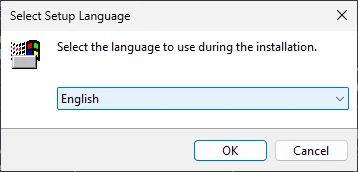
Real screenshot · RetroBar 1.22.122 · Windows 11 (Arm64) build 26200.9711The first window: the language of the installer only. RetroBar's own language is chosen later, in its Properties. Accept the licence
RetroBar is free software under the Apache License 2.0. Select I accept the agreement, then Next.
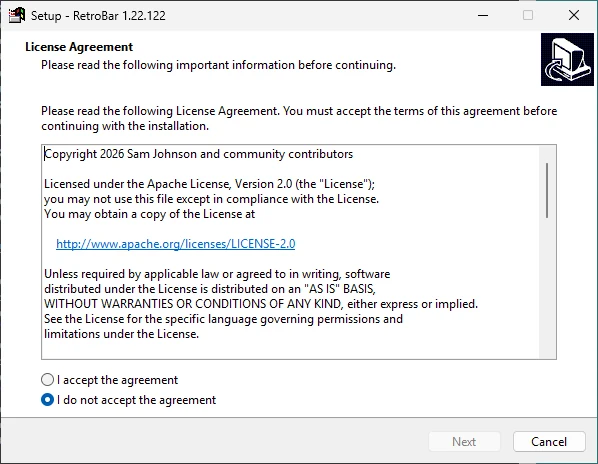
Real screenshot · RetroBar 1.22.122 · Windows 11 (Arm64) build 26200.9711The licence page. Keep the suggested folder
RetroBar installs to
C:\Users\you\AppData\Local\Programs\RetroBarand needs 5.4 MB. Keep it unless you have a reason: guides (including ours) assume this folder, and installing under Program Files would need administrator rights.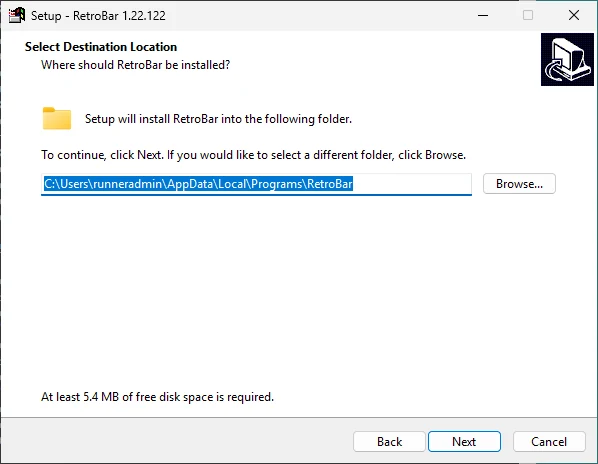
Real screenshot · RetroBar 1.22.122 · Windows 11 (Arm64) build 26200.9711Select Destination Location, with the default per-user folder. Choose the extra tasks
Both are off by default:
- Create a desktop shortcut: a RetroBar icon on the desktop. A Start menu shortcut is always created.
- Automatically start RetroBar: starts RetroBar every time you sign in. Tick this if you want RetroBar instead of the Windows taskbar from now on. You can change it later in Properties (“Automatically start at logon”).

Real screenshot · RetroBar 1.22.122 · Windows 11 (Arm64) build 26200.9711Select Additional Tasks: both options unticked by default. Install
Click Install. If .NET 10 is already on your PC, this takes a few seconds.
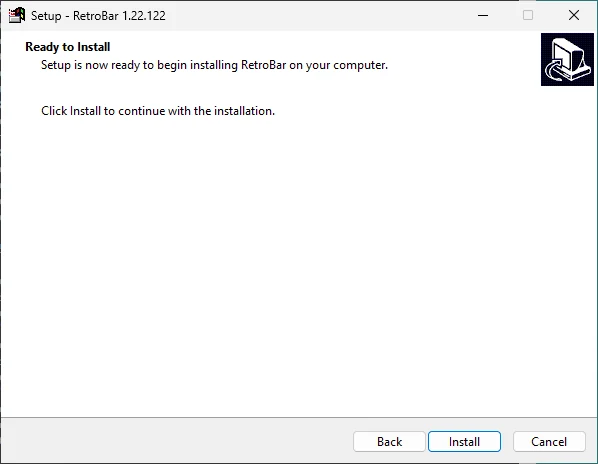
Real screenshot · RetroBar 1.22.122 · Windows 11 (Arm64) build 26200.9711Ready to Install on a PC that already has .NET 10. Finish
Leave Launch RetroBar ticked and click Finish. RetroBar appears at the bottom of the screen with the Windows 95-98 theme, and the Windows taskbar is hidden.
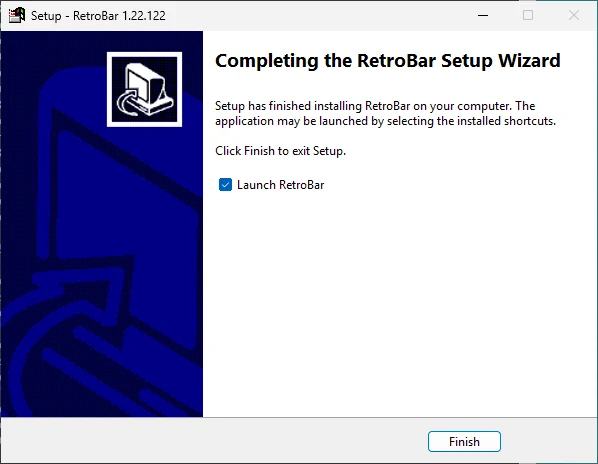
Real screenshot · RetroBar 1.22.122 · Windows 11 (Arm64) build 26200.9711The last page, with Launch RetroBar ticked.
If .NET 10 is missing: the step that looks stuck
RetroBar 1.22.122 needs the .NET 10 Desktop Runtime on Windows 10 and 11. If the installer does not find it, the Ready to Install page says so:
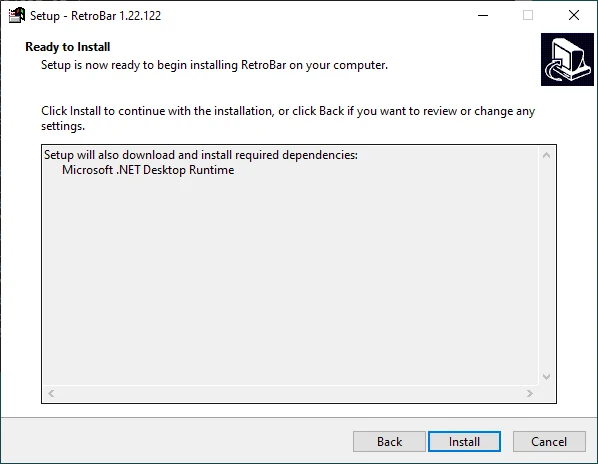
After you click Install, the installer downloads Microsoft's runtime installer and starts it. That opens a second window, “Microsoft Windows Desktop Runtime … Installer”, which waits for you to click Install. It often opens behind RetroBar's setup window, so all you see is a full progress bar and “Installing Microsoft .NET Desktop Runtime…” that never finishes.

Our Windows Server 2022 test machine had .NET 9 but not 10. The installer downloaded windowsdesktop-runtime-10.0.14-win-x64.exe from Microsoft's dotnetcli.azureedge.net server, as its log shows. You can also install the runtime yourself first from dotnet.microsoft.com (“.NET Desktop Runtime”, for your processor).
What the installer changed
We recorded the PC before and after installing. RetroBar's installer:
- copied 103 files to
%LOCALAPPDATA%\Programs\RetroBar, withThemes,LanguagesandResourcesfolders inside (the uninstall entry puts the size at about 14.5 MB, although the wizard asks for 5.4 MB of free space); - added a RetroBar shortcut to your Start menu;
- registered an uninstaller for your account (it appears in Settings › Apps);
- added a
RetroBarentry to your sign-in startup list only if you ticked “Automatically start RetroBar”; - installed the .NET 10 Desktop Runtime for all users, if it was missing.
RetroBar's own settings file, %LOCALAPPDATA%\RetroBar\settings.json, does not exist yet after installing: RetroBar writes it the first time you change a setting.
Without installing: the portable version
If you would rather not install anything, download RetroBar.Portable.zip, extract it, and run RetroBar.exe from the folder for your PC (x64, ARM64 or x86; Win7-8 for Windows 7 and 8.1). The download chooser tells you which one. The portable version needs the .NET 10 Desktop Runtime too; if it is missing, Windows offers to download it when you start RetroBar.exe. There is no Start menu shortcut and no automatic start unless you tick “Automatically start at logon” in Properties.
With winget
In Terminal or Command Prompt:
winget install dremin.RetroBarwinget runs the same installer silently. Its manifest installs RetroBar for all users in Program Files, so Windows asks for administrator permission. See winget, Scoop and Chocolatey for the current versions in each.
Next steps
Questions
Does installing RetroBar need administrator rights?
Not for RetroBar: the installer from GitHub installs for your account only, in your user folder. Installing the .NET 10 Desktop Runtime does, if your PC does not have it yet, and so does installing with winget.
How do I update RetroBar?
Download the new installer and run it. It installs over the old version in the same folder and keeps your settings, which live in %LOCALAPPDATA%\RetroBar.
RetroBar did not start after installing. What now?
Start it from the Start menu (type RetroBar). If nothing happens, the .NET 10 Desktop Runtime is probably missing or did not finish installing: install it from dotnet.microsoft.com and try again. More in troubleshooting.
Can I install RetroBar on Windows 7?
Yes. The same installer installs the Windows 7 and 8.1 build, which uses the .NET 6 Desktop Runtime instead of .NET 10.
Keep going
Found something out of date or wrong? Tell us at hello@retrobar.dev and we will fix it.