Retro makeover
Make Windows 11 look like Windows 95 or 98
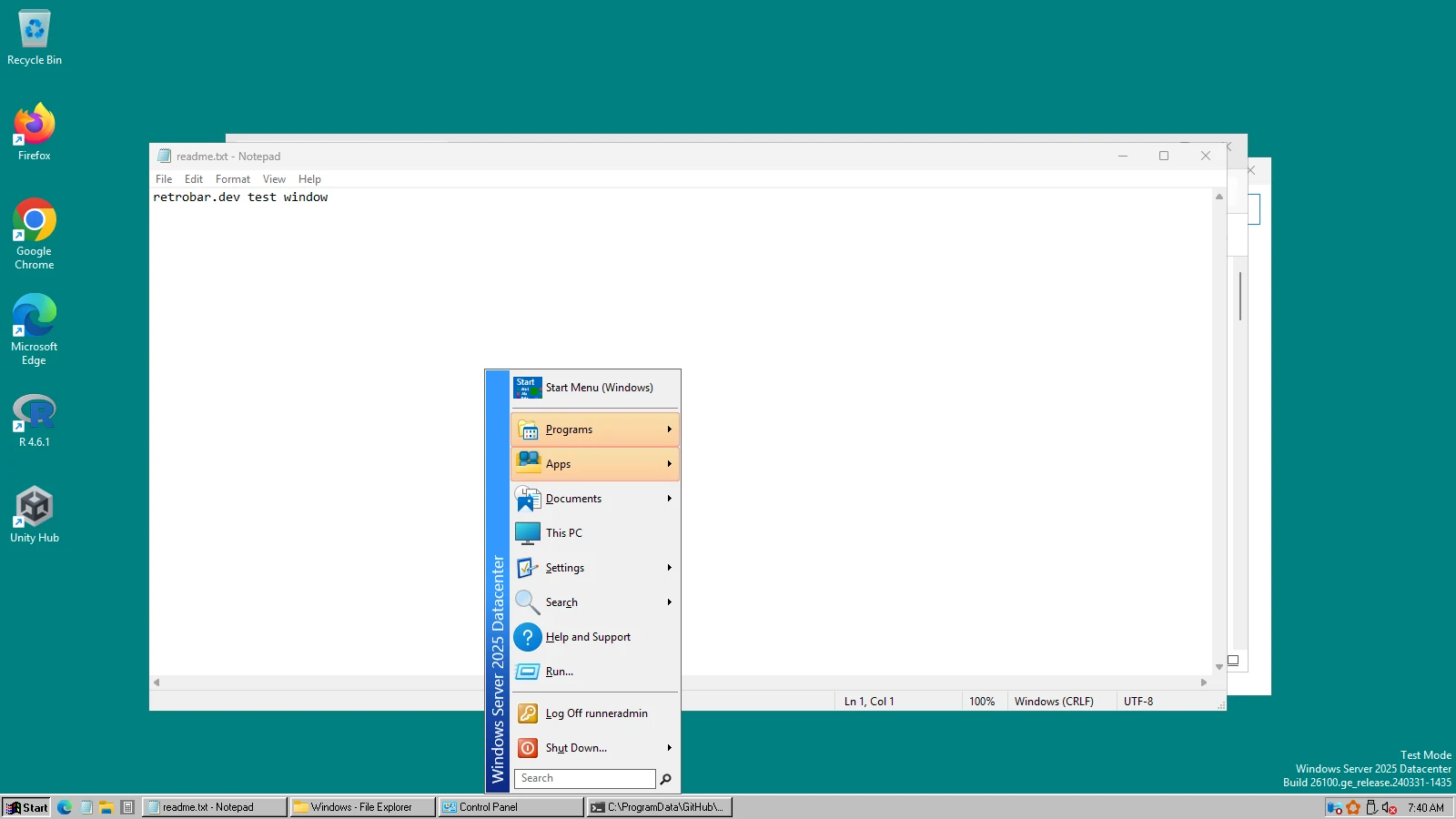
The grey taskbar, the bold Start button and the single-column Start menu are the heart of the Windows 95 look, and you can have all three on Windows 11 for free. We tested this combination on Windows. Here is the full recipe, including the parts that cannot be done.
On this page 5 sections
Short answer
Can I make Windows 11 look like Windows 95?
The taskbar and Start menu, yes: RetroBar's default theme is Windows 95-98, and Open-Shell's Classic style gives the single-column menu with a side banner. Add a teal desktop colour and you have the familiar first impression. Windows themselves, File Explorer and Settings keep the Windows 11 look.
The checklist
| Part | How | Cost | Tested by us |
|---|---|---|---|
| Taskbar | RetroBar, Windows 95-98 theme (the default); Windows Me or 2000 themes for those versions | Free | Yes |
| Start menu | Open-Shell with our Classic preset | Free | Yes |
| Desktop colour | Settings › Personalization › Background › Solid color, custom colour #008080 (teal, the Windows 95 default) | Free | Yes, on our test machines |
| Window frames | Paid skinning tools, or enthusiast classic-theme projects; not covered here | — | No |
| File Explorer, Settings, modern apps | Not possible | — | — |
Step by step
Make it 95
Windows 95 had no Quick Launch (it came with Windows 98): untick “Show Quick Launch” in Properties › Taskbar for the original 95 look, or keep it for 98.
Add the classic Start menu
Install Open-Shell (only the Open-Shell Menu part) and load our Classic preset.
Set the teal desktop
Settings › Personalization › Background › Solid color › View colors › More, and enter
#008080. Our test machines use exactly this colour for the classic screenshots on this site.
95, 98, Me or 2000?
The four looked alike; the differences are in the grey and the font. RetroBar has three themes for them:
Real screenshots · RetroBar 1.22.122 · Windows Server 2025 build 26100.33650 · shown at 2×
Windows 95, 98, Me and 2000






What will stay Windows 11
Title bars, File Explorer, Settings, the search and notification panels, and Store apps. For title bars, see the window frames row in our XP guide; the same tools apply.
Questions
Is there a Windows 95 Start menu?
Open-Shell's Classic style is the single-column menu with a vertical banner that Windows 95 introduced. Our Classic preset sets it up with the classic skin.
Can I run real Windows 95 programs?
That is a different thing: RetroBar changes the look of Windows 11, not what it can run. Old 16-bit programs need an emulator or a virtual machine.
Keep going
Found something out of date or wrong? Tell us at hello@retrobar.dev and we will fix it.