Compare
RetroBar vs ExplorerPatcher
ExplorerPatcher brings back Windows 10's own taskbar on Windows 11; RetroBar adds a separate taskbar in the style of Windows 95 to Vista. We installed ExplorerPatcher on the same machines we test RetroBar on, photographed what it does, and uninstalled it again.
On this page 6 sections
Short answer
Should I use RetroBar or ExplorerPatcher?
For Windows 10's taskbar on Windows 11, ExplorerPatcher: it is the real Windows 10 taskbar, and with one setting the Windows 10 Start menu too. For a Windows 95, 98, 2000, XP or Vista taskbar, RetroBar, which ExplorerPatcher has no styles for. ExplorerPatcher changes Explorer itself; RetroBar runs beside it.
What each gives you



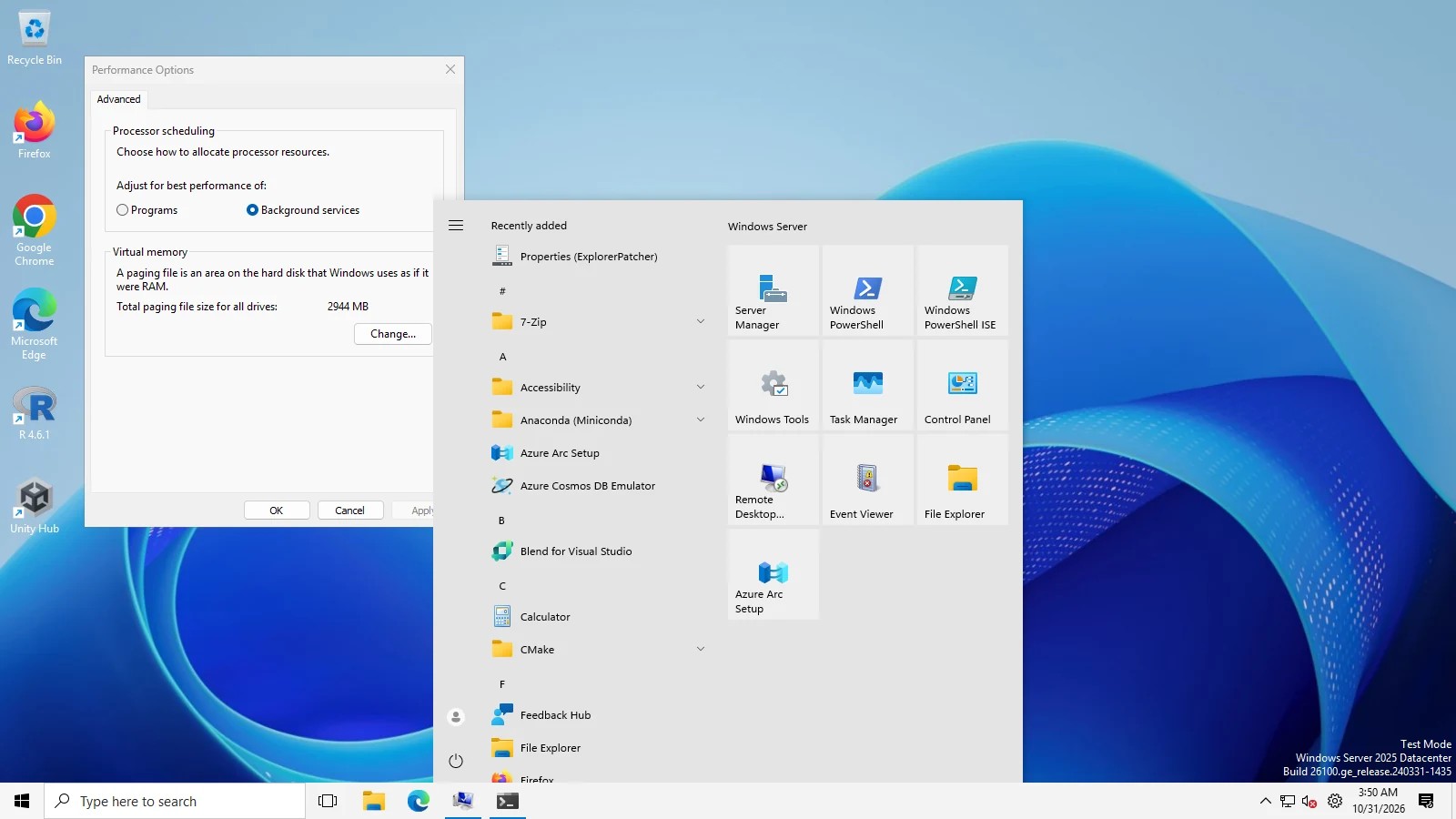
About the Windows 10 Start menu
With its default settings, ExplorerPatcher gave us the Windows 10 taskbar but kept Windows 11's Start menu. Turning on its Windows 10 Start menu worked on both test machines (Windows 11 25H2 on Arm64 and Server 2025, build 26100). Its own release notes warn that newer Insider builds (26220.8474 and later) removed parts of that menu from Windows, that the option is hidden there, and that their replacement is only a partial restoration. So on future Windows versions this part may stop working.
The differences
| ExplorerPatcher | RetroBar | |
|---|---|---|
| Looks | Windows 10's taskbar (or Windows 11's); Windows 10 or 11 Start menu | 19 built-in themes from Windows 95 to Vista, plus community themes |
| How it works | Installs into Windows: patches Explorer and places a dxgi.dll in the Windows folder (per its release notes) | A separate program that hides Windows' taskbar and draws its own; Windows' files are not changed |
| Install | Into Program Files (administrator); setup ran with no window in our test | Per-user installer, no administrator rights; or the portable zip |
| Code signature | None (the setup files we downloaded) | None either (details) |
| Warnings from its makers | Turn off Smart App Control first; do not install with SentinelOne; download only from its GitHub page | None of this kind |
| Start menu | Windows 11's by default; Windows 10's as an option | Opens your Start menu; add Open-Shell for a classic one |
| Removing it | Uninstaller with two prompts; Windows 11's taskbar came back; its registry settings stayed | Normal uninstaller; it asks whether to delete your settings (tested) |
| Licence | Free, open source (GPL-2.0) | Free, open source (Apache-2.0) |
Which to choose
- ExplorerPatcher if you want Windows 10 back as it was, taskbar and Start menu, and are comfortable with a tool that changes Explorer and needs updating when Windows updates.
- RetroBar for the older looks, for a taskbar that does not depend on Explorer's internals, or if you prefer a program you can simply close.
- Not together: both replace what you see at the bottom of the screen. If you try RetroBar with ExplorerPatcher installed, set ExplorerPatcher's taskbar back to Windows 11's first (our troubleshooting page explains why two taskbar tools clash).
How we tested ExplorerPatcher
On 31 October 2026, on GitHub's Windows 11 Enterprise 25H2 (Arm64) and Windows Server 2025 runners, our script explorerpatcher.ps1:
- Downloaded ExplorerPatcher 26100.8457.70.3, the release marked “Latest” on its GitHub page (2026-06-20):
ep_setup.exeon the x64 machine,ep_setup_arm64.exeon the Arm64 one. Neither file carried an Authenticode signature (Windows reported “NotSigned”). - Ran the setup with no options. It showed no window and finished within 4 seconds, installing into
C:\Program Files\ExplorerPatcherand restarting Explorer. - Photographed the taskbar and the Start menu (Windows key) with its default settings.
- Set the registry value
OldTaskbar(underHKCU\Software\ExplorerPatcher) to 1 and then 2, restarting Explorer each time, and photographed each. - Set
Start_ShowClassicModeto 1 (underHKCU\…\Explorer\Advanced), restarted Explorer and Start, and pressed the Windows key. - Ran its uninstaller (the command Windows lists for it under installed apps). It asked “Are you sure you want to remove ExplorerPatcher from your PC?” and then said “Uninstall completed. Thank you for using ExplorerPatcher.”.
| Machine | Installed | Uninstalled cleanly (program folder and entry gone) | Its settings left in the registry |
|---|---|---|---|
| Windows 11 (Arm64), build 26200.9711 | Yes | Yes | Yes |
| Windows Server 2025, build 26100.33674 | Yes | Yes | Yes |
Raw results: Windows 11 (Arm64), Windows Server 2025.
Questions
Is ExplorerPatcher safe?
It is open source and widely used. Its makers say to download it only from its GitHub releases page, because copies elsewhere have carried malware. The setup files we downloaded there were not code-signed (RetroBar's are not either), and it changes how Explorer runs, so its makers ask you to turn off Smart App Control before installing and warn about one security product (SentinelOne) that can block uninstalling it.
Does ExplorerPatcher work on Arm PCs?
Yes, in our test: its Arm64 setup installed and gave the Windows 10 taskbar and Start menu on Windows 11 25H2 (Arm64).
Can ExplorerPatcher look like Windows XP or 7?
Not by itself: its styles are Windows 10's and 11's. For XP, Vista or 2000 looks, use RetroBar; for 7, RetroBar with the Windows 7 community theme, or the paid StartAllBack.
Keep going
Found something out of date or wrong? Tell us at hello@retrobar.dev and we will fix it.