Retro makeover
Make Windows 11 look like Windows XP
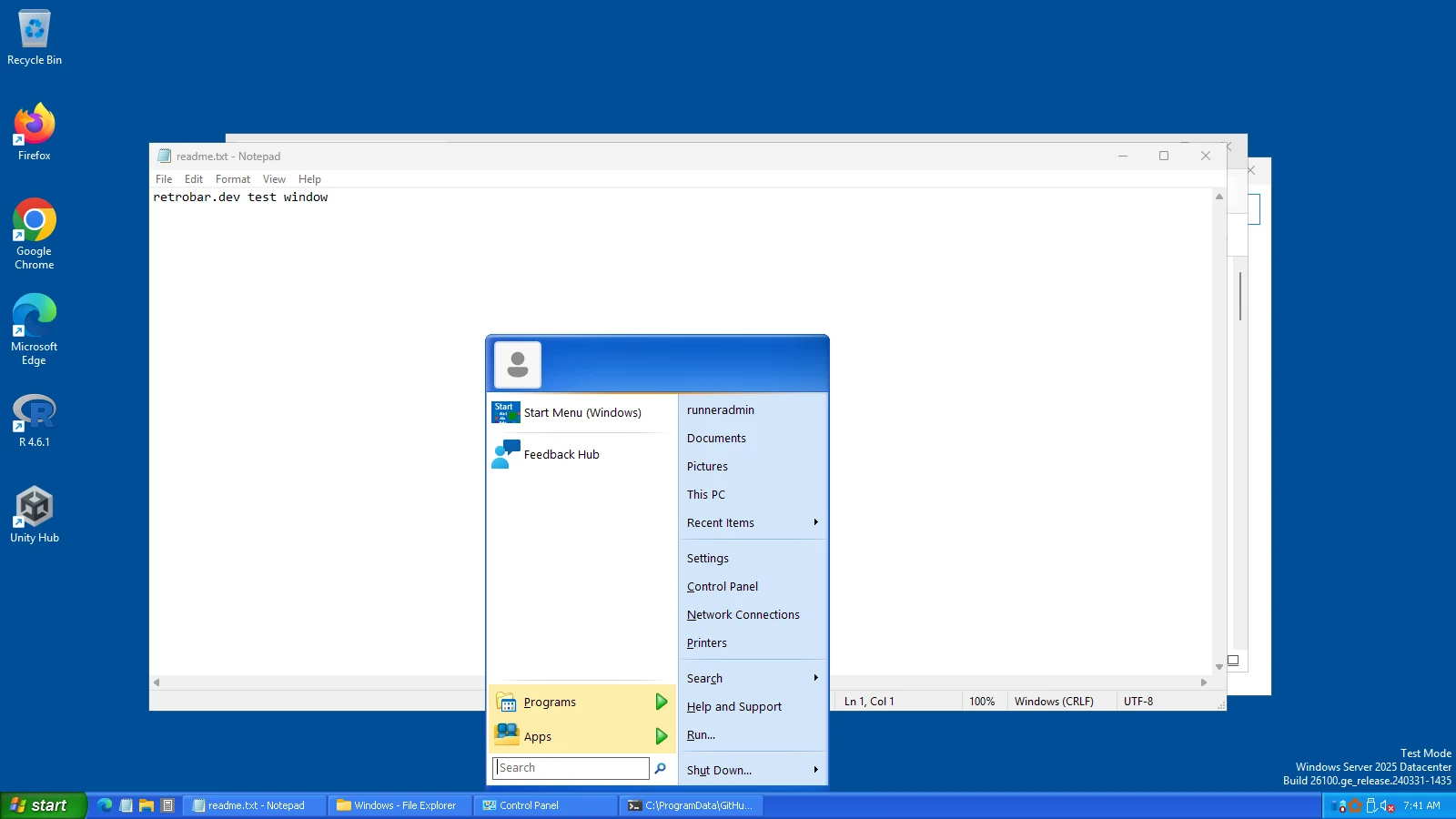
You can get a long way towards Windows XP on Windows 11 for free: the blue taskbar, the green Start button and an XP-style Start menu take about ten minutes, and we tested them on Windows. Window frames and File Explorer are harder, and a few things cannot be changed at all. Here is the whole list, part by part.
On this page 6 sections
Short answer
Can you make Windows 11 look like Windows XP?
Partly. The taskbar and Start menu can look very much like XP with two free programs, RetroBar and Open-Shell. Window title bars and buttons need a paid skinning program such as Stardock's WindowBlinds. File Explorer, Settings and modern apps keep Windows 11's design whatever you install.
The checklist
| Part | Tool | Cost | How close | Tested by us |
|---|---|---|---|---|
| Taskbar, Start button, Quick Launch, notification area | RetroBar, Windows XP Blue theme | Free | Very close | Yes |
| Start menu | Open-Shell with our XP preset | Free | Close: two columns, Luna skin | Yes |
| Window title bars and buttons | WindowBlinds (Stardock); Stardock says it can theme the desktop to look like XP together with Start11 | Paid | Depends on the skin | No |
| File Explorer | None makes it XP; StartAllBack restores a Windows 7-style command bar, but it also changes the taskbar, which conflicts with RetroBar | — | Not possible | No |
| Wallpaper | Any green hills photo, or XP's “Bliss” if you have a copy; set in Settings › Personalization › Background | Free | Exact if you have the image | — |
| Sounds | Settings › System › Sound › More sound settings › Sounds tab: assign .wav files to events | Free | Exact if you have the sounds | — |
| Settings, Start's search, modern apps, sign-in screen | Nothing | — | Not possible | — |
Windows XP's wallpaper and sounds are Microsoft's copyrighted files, so we do not offer them for download. Third-party facts are from the vendors' own pages; see alternatives.
1. The taskbar (RetroBar)
Pick Windows XP Blue
Right-click the taskbar › Properties › Theme: Windows XP Blue (or Olive Green, Silver, Royale).
Match XP's settings
Tick “Collapse notification area icons” (Notification area tab) for XP's hide-inactive-icons arrow, keep Quick Launch on, seconds and window previews off, and tick “Automatically start at logon”. The Settings Builder can apply all of these with one script.

2. The Start menu (Open-Shell)
Install Open-Shell (only the “Open-Shell Menu” part), then load our XP preset. RetroBar's green Start button and the Windows key then open a two-column menu with the Windows XP Luna skin; choose its Olive Green or Silver variation to match those themes.
3. Windows and title bars
This is the part RetroBar and Open-Shell do not touch. Windows 11 draws title bars itself, and changing them takes a program that hooks into how Windows draws windows. The established commercial one is Stardock's WindowBlinds, whose page says that “when paired with Start11, you can theme your entire desktop to look like an alternative operating system such as Windows XP.” We have not tested it. Expect apps that draw their own title bars (browsers, Office, many modern apps) to keep their own look either way.
What will stay Windows 11
- The Settings app, Windows Search and Start's search results, notifications and quick settings.
- File Explorer's layout and the right-click menus of Explorer.
- Apps from the Microsoft Store and others built with Windows 11's design.
- The sign-in and lock screens (only their pictures can change).
So the realistic goal is “XP at a glance”: the taskbar and Start menu you look at all day, which is where Windows XP's character mostly was.
Questions
Is there a free way to get XP title bars?
Not one we have tested and can recommend. Free classic-theme tools exist in enthusiast communities, but they change how Windows draws windows and may break with Windows updates.
Can I get the XP startup sound?
Not from Windows' settings: the startup sound is not one of the events you can reassign in the Sounds tab. Other event sounds (errors, notifications, Windows logon and logoff where listed) can be set to your own .wav files there.
Will this slow down my PC?
RetroBar and Open-Shell are light: RetroBar used about 115 to 135 MB of memory and almost no CPU in our measurements.
Keep going
Found something out of date or wrong? Tell us at hello@retrobar.dev and we will fix it.