Compare
RetroBar vs Windhawk
Both can give Windows 11 an XP, Vista or 7-style taskbar, in very different ways. Windhawk's Windows 11 Taskbar Styler mod repaints Windows' own taskbar; RetroBar replaces it with a separate classic taskbar. We ran both on the same test machines and photographed the results.
On this page 7 sections
Short answer
Which is better, RetroBar or Windhawk?
For a taskbar that works like the old one (Start button on the left, Quick Launch, task buttons with titles, Windows 95 to 2000 looks), RetroBar. For Windows 11's taskbar coloured like XP, Vista or 7 while keeping its centred icons, Search box and Start menu, Windhawk with the Taskbar Styler mod. In our tests both worked on Windows 11 (Arm64) and Windows Server 2025, and both could be turned off cleanly.
The XP look, side by side


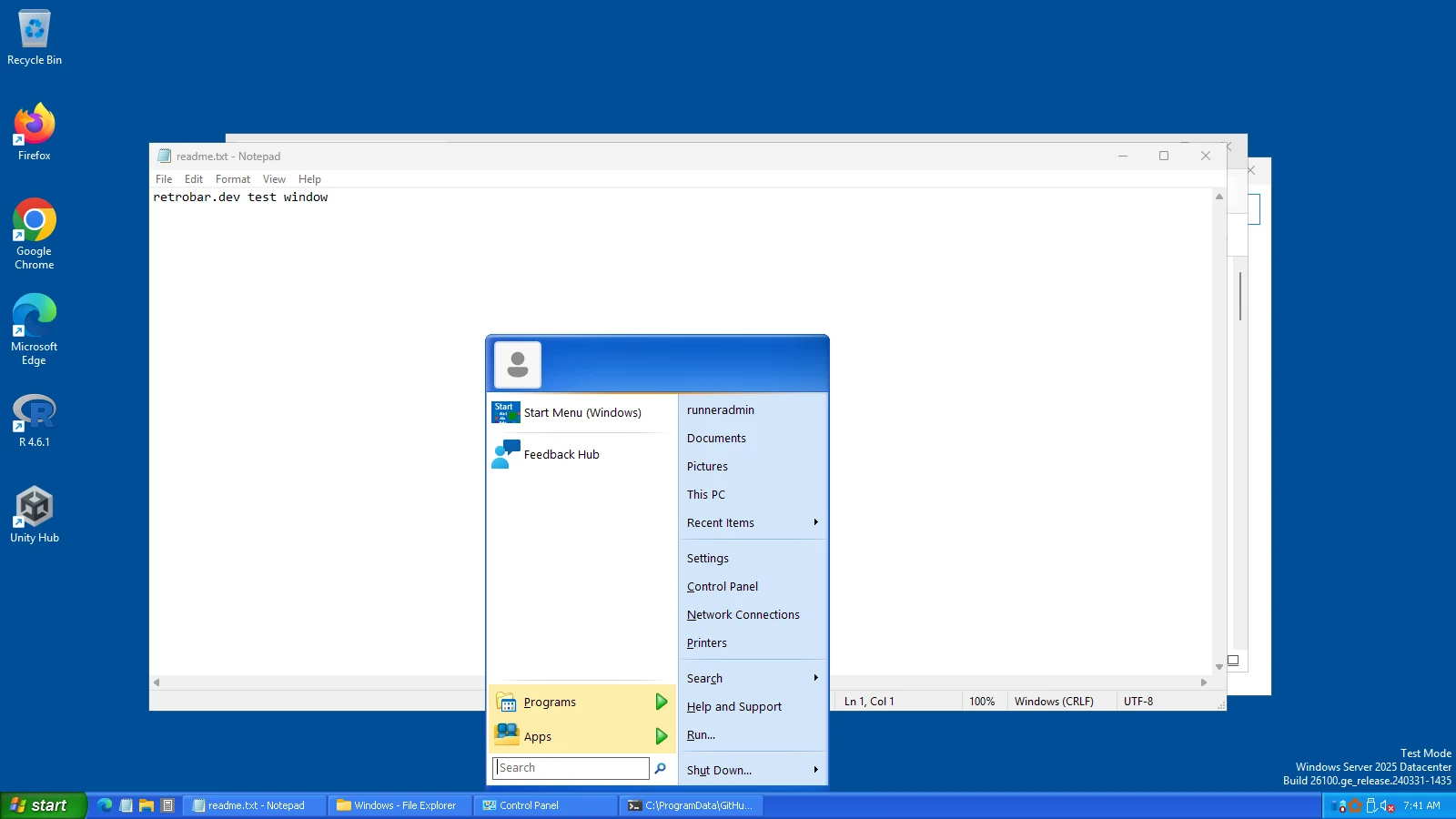
Vista and 7


Windows 11 (Arm64) gave the same results for Windhawk: screenshots below.
The differences
| Windhawk + Taskbar Styler | RetroBar | |
|---|---|---|
| How it works | Injects a mod into Explorer and restyles Windows 11's own taskbar | A separate program that hides Windows' taskbar and draws its own; nothing is injected |
| Layout | Windows 11's: centred icons, Search box, icon-only buttons (other mods change some of this) | Classic: Start button, Quick Launch, task buttons with titles, notification area, up to several rows |
| Looks | WinXP, WinXP (Zune), WinVista, Windows7 in the mod, about 40 in its community gallery; none for 95, 98 or 2000 | 19 built-in themes from Windows 95 to Vista, plus community themes (Windows 7, flat, Windows 10 Dark) |
| Start menu | Windows 11's | Opens whatever Start menu you have; add Open-Shell for a classic one |
| Windows 10 | The mod is made for Windows 11's taskbar (not tested by us on Windows 10) | Works on Windows 10 and 11 (tested on Server 2022, the Windows 10 shell); 7 and 8.1 builds too |
| Install | Installs to Program Files, so it needs administrator rights; mods are added in Windhawk's window or with its command-line tool | Per-user installer, no administrator rights; or the portable zip |
| Memory in our tests | Windhawk's two processes: 23 MB (Server 2025), 44 MB (Arm64), plus the mod inside Explorer | 115 to 133 MB for RetroBar (a .NET program), measured on three machines |
| Turning it off | Disable the mod: Windows 11's normal taskbar was back when we looked 10 seconds later | Exit RetroBar from its menu: Windows' taskbar came back in our tests on Server 2025 and 2022 |
| Licence | Free, open source (GPL-3.0) | Free, open source (Apache-2.0) |
Which to choose
- Choose RetroBar for Windows 95, 98, Me or 2000, for task buttons with titles and Quick Launch, for multiple rows or a taskbar on the side, or if you prefer not to inject code into Explorer.
- Choose Windhawk if you like Windows 11's taskbar and Start menu and only want XP, Vista or 7 colours, or if you already use Windhawk for other mods.
- Not both on the same taskbar: RetroBar hides Windows' taskbar, so styling it with Windhawk has no visible effect while RetroBar runs. Windhawk mods that change other parts of Windows can be used alongside RetroBar.
How we tested Windhawk
On 31 October 2026, on GitHub's Windows 11 Enterprise 25H2 (Arm64) and Windows Server 2025 runners, our script windhawk.ps1:
- Downloaded Windhawk 2.0.0-alpha.8 (2026-10-25), a pre-release, from its GitHub release: the command-line tool used below is new in 2.0; the latest stable version, v1.7.3, does not have it. SHA-256
7327471e2d93a8c58481321cce546632adb146cf125d17d7144d0e7d2a064967, signature Valid (Open Source Developer, Michael Maltsev). - Installed it silently (
/S) intoC:\Program Files\Windhawk. - Ran
windhawk-cli.exe mod install windows-11-taskbar-styler: “Installed: windows-11-taskbar-styler 1.10”, “Method: downloaded precompiled”. - Set each theme with
windhawk-cli.exe mod settings set windows-11-taskbar-styler theme=WinXP(thenWinVista,Windows7), waited 12 seconds, and took a screenshot, then one with the Windows key pressed. - Turned the mod off with
mod disableand took a last screenshot.
| Machine | Mod installed | Themes applied | Windhawk processes | Explorer before → after |
|---|---|---|---|---|
| Windows 11 (Arm64), build 26200.9711 | Yes | Yes, all three | 44 MB | 225 → 236 MB |
| Windows Server 2025, build 26100.33650 | Yes | Yes, all three | 23 MB | 164 → 178 MB |
Memory is each process's working set, read once after the themes were applied, so treat the Explorer change as approximate. Raw results: Windows 11 (Arm64), Windows Server 2025. The Taskbar Styler mod itself was the same on both machines (Windows 11 Taskbar Styler 1.10 by m417z, built for x86-64).
Windhawk on Windows 11 (Arm64)


Questions
Is Windhawk safe?
Windhawk is open source, and the installer we downloaded from its GitHub release carried a valid code signature (“Open Source Developer, Michael Maltsev”). It works by injecting mods into other programs, and mods are written by different people, so read a mod's page before installing it. We tested only the Windows 11 Taskbar Styler mod.
Does the Taskbar Styler work on Arm PCs?
In our test, yes: on Windows 11 25H2 (Arm64) the mod, which Windhawk reported as an x86-64 build, restyled the taskbar exactly as on the x64 machine.
Can Windhawk move the taskbar or add Quick Launch?
Not with the Taskbar Styler alone, which changes appearance. Other Windhawk mods change taskbar behaviour; we have not tested them. RetroBar has Quick Launch and puts the taskbar on any edge (tested).
Keep going
Found something out of date or wrong? Tell us at hello@retrobar.dev and we will fix it.